Page order has its own tool
Reorder PDF pages sounds like a separate product. In practice you have one file, two pages are swapped, or a scanned sheet landed at the front and belongs at the back. You want a new PDF in the right order and you want the original kept.
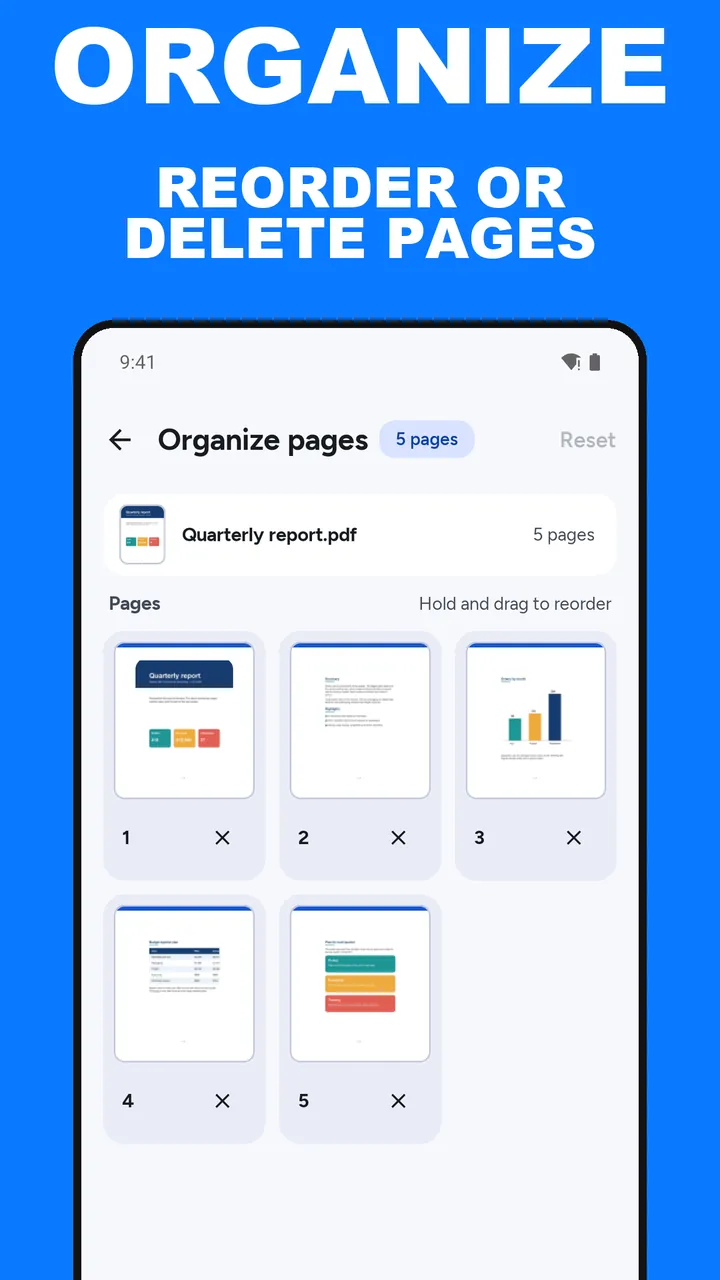
ViaPDF does this in Organize pages. Open the PDF and every page shows as a thumbnail. Hold a page and drag it to a new place, or tap × to delete it. Then tap Save N pages to write a new file, Organized.pdf. If you want to join several files instead, that is Merge: see merge PDF files on Android.
The saved file is written as page images, so text in it is not selectable. Run OCR on the result and tap Save searchable PDF if you need searchable text.
Reorder versus extract
- Reorder when most of the pages stay, and a few need to move or disappear.
- Extract when you only want a short run, such as pages 8–10, and the rest should not be in the file at all. Use extract pages from a PDF.
The thumbnails are the document. The order you see before you tap Save N pages is the order in the file you share.
How to reorder pages in ViaPDF
- Open Organize pagesOn the Tools tab, tap Organize pages and choose the PDF, or tap Open PDF first and then pick Organize pages. You need only one file.
- Drag pages into orderHold a page thumbnail and drag it earlier or later. Repeat until the order is right.
- Remove pages you do not wantTap × on a page to leave it out of the new file. Undo brings it back for a few seconds. The original PDF is not edited.
- Reset if you overshootTap Reset to go back to the original order and start again.
- Save the new orderTap Save N pages. ViaPDF writes Organized.pdf. Then Save or Share it. The first export is free. After a Save, Keep going with this file offers shortcuts into another tool.
Do this job on your phoneFree to download. The first export is free. Then pay once. Google Play shows your local price. The file stays on the device until you share it.
Reorder PDF pages FAQ
Do I need two PDFs to reorder one file?
No. Organize pages takes one PDF. Open it, drag the pages, and save.
Can I delete a page this way?
Yes. Tap × to drop it, and tap Undo if you change your mind. For keeping a range and discarding everything else, Split is often faster. See extract pages from a PDF.
Can I go back to the original order?
Yes. Tap Reset to restore the original order. Undo brings back a page you removed with ×.
Can I reorder pages from two files at once?
Yes, in Merge. Add both files and drag pages under Pages in order. That flow is in merge PDF files on Android.