The Android clipboard holds one item
When people search for how to copy multiple things at once on Android, the honest answer is that the system cannot. Every copy overwrites the last one. What you can do is keep the earlier copies somewhere and bring them back.
Option one: paste one at a time from the keyboard
Gboard and Samsung Keyboard both keep a short clipboard list. Copy your three items, open the keyboard clipboard, and tap them one after another. It works for a quick job. Gboard forgets unpinned clips after about an hour, and you still paste each piece separately.
Option two: merge the copies into one clip
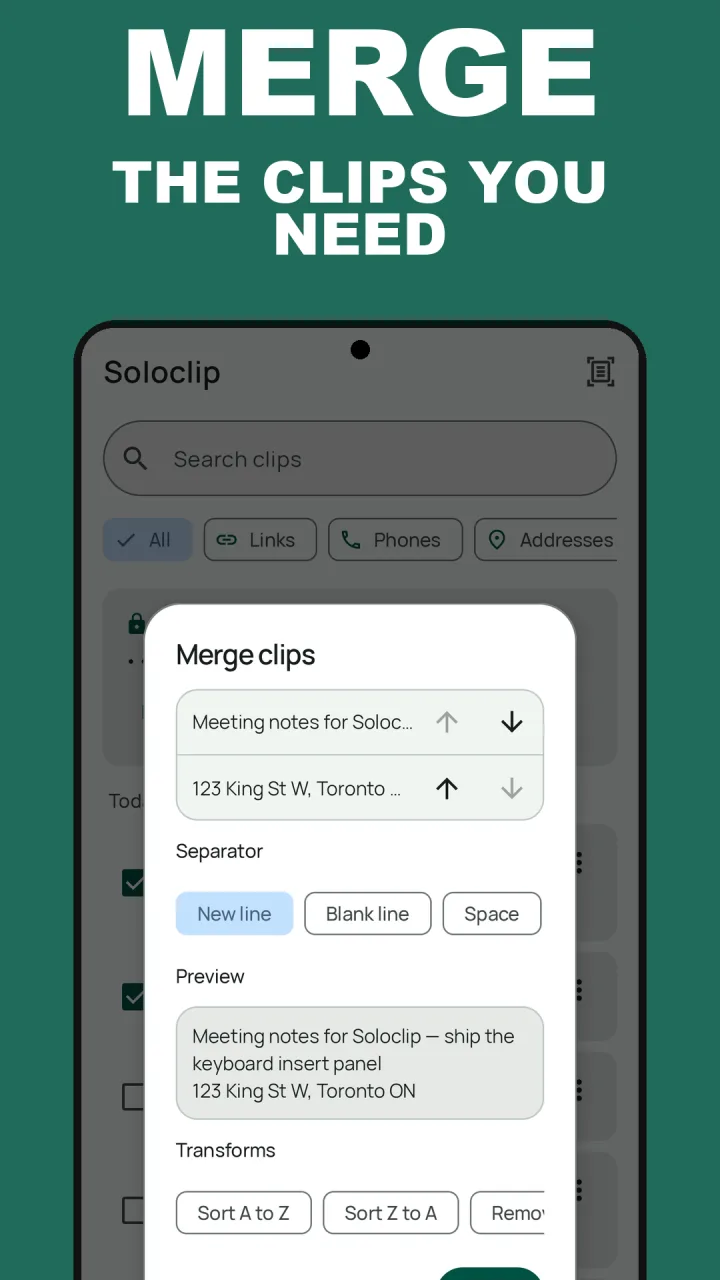
Soloclip keeps every copy as a clip in History, on this phone. Select the ones you need and merge them into a single clip with the separator you choose. Paste once and you are done. The same sheet can sort lines, remove duplicate lines and number them.
Good for lists. Collect ten links during research, merge them with new lines, and paste the whole list into a note or an email.
Merge clips in Soloclip
Capture is honest: Soloclip saves a copy when its keyboard panel is open, when the app is in focus, or when you save it yourself. It does not read the clipboard in the background.
- Save each pieceCopy with the Soloclip panel open, or select the text and tap Save to Soloclip. Each piece becomes its own clip in History.
- Select the clips to combineIn History, select between 2 and 50 clips, then tap Merge. Merge is part of the one-time unlock.
- Set the orderMove clips up or down until they read the way you want.
- Pick a separatorNew line, blank line, space, comma, semicolon, or one you type.
- Check the preview and saveThe merged text is saved as a new clip. The originals stay where they were.
Keep clipboard history on this phoneFree to download with unlimited history. Unlock once. No ads. No subscription.
Copy multiple items FAQ
Can Android copy more than one thing at a time?
Not on its own. The system clipboard holds a single item. A keyboard clipboard or a clipboard manager keeps the earlier ones.
Can I paste several clips without merging?
Yes. Open the Gboard or Samsung clipboard and tap each item in turn. With the Soloclip keyboard panel, tap each clip to insert it.
Is merge free?
History, search and saving are free. Merge and transforms are part of the one-time unlock.