What changed
Microsoft Lens was a free scanner many people used for whiteboards, receipts and documents. Microsoft has retired the app and suggests scanning with the OneDrive app instead, which saves scans to your OneDrive.
That suits people who live in OneDrive. If you want the scans to stay on the phone, with nothing to sign in to, a local scanner is the closer replacement.
What Filetray covers
- Document scanning. Camera capture with edge detection and crop, many pages into one PDF.
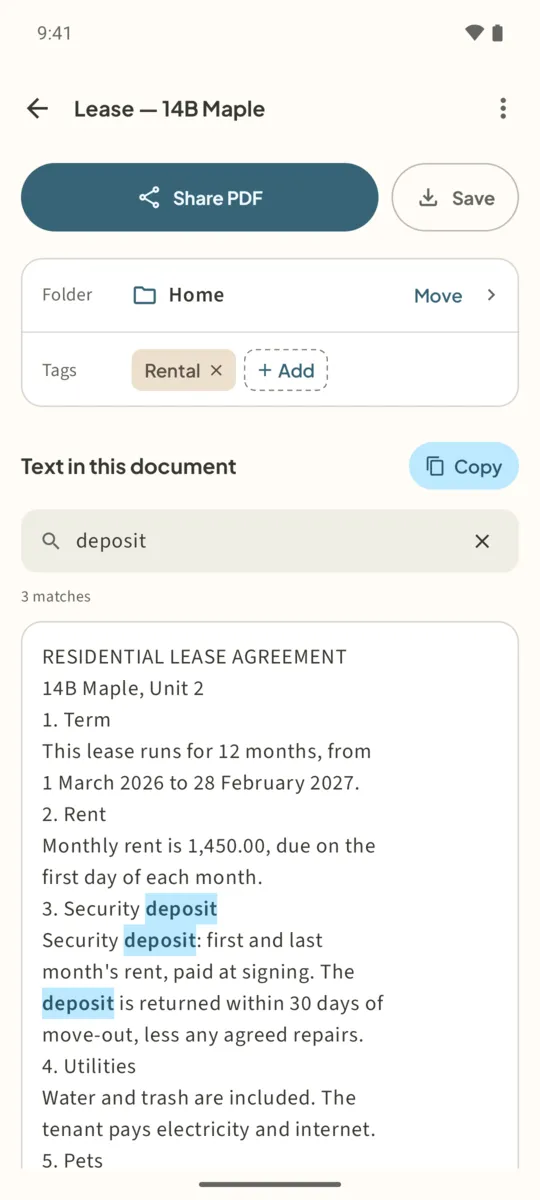
- Text from the page. On-device text recognition you can search and copy.
- A place to keep scans. Folders, tags, titles and one search box for all of it.
- Sharing. Share PDF to email or chat, or Save it to Files, including a cloud folder you choose in the file picker.
What it does not do: Filetray makes PDFs, not Word or PowerPoint files, and it has no whiteboard or business-card mode.
Scan with Filetray instead of Lens
- Install FiletrayGet Filetray from Google Play. It runs on Android 8.0 and later. No account to create.
- Scan a documentTap Scan a document, capture each page and finish the scan. The pages become one PDF.
- Name and file itTap the pencil to rename it, and Move to put it in a folder.
- Get the textIn Text in this document, tap Read text (automatic with Lifetime), then Copy or Find in this document.
- Send it where it needs to goTap Share PDF, or Save to pick a location in Files.
Filetray is free for up to 5 documents, with text recognition on one. Filetray Lifetime, a one-time purchase on Google Play, removes the limits and the small “Made with Filetray” footer on PDFs.
Scan it once. Find it later.Free to download, free for up to 5 documents. Filetray Lifetime is a one-time purchase, and Google Play shows your local price.
Microsoft Lens alternative: questions
Can I still use Microsoft Lens?
Microsoft has retired Lens, and Microsoft suggests the OneDrive app for scanning. Check Microsoft’s support pages for the current details.
Can Filetray save to OneDrive?
Filetray does not sign in to OneDrive. Tap Save and pick a location in the Android file picker; if the OneDrive app is installed and shows up there, you can choose it. Or use Share PDF.
Does Filetray make Word files?
No. Filetray makes PDFs. You can copy the recognized text and paste it into a document.